
Every Trainer. Every Unit. Qualified or Not. One Screen.
Trainers are required to have a matrix in place — but most RTOs struggle to get trainers to build one, let alone keep it current. ComplyHub guides every trainer through their initial mapping once. After that, the monthly Trainer Report handles every update automatically.

Most Trainers Have Never Been Asked to Map Their Skills Against the Units They Deliver.
A Trainers Matrix is not optional — it is the evidence that every person delivering and assessing training on the RTO's scope is qualified to do so. But most RTOs face the same two problems: trainers either don't know how to map their qualifications and industry experience against the specific units they deliver, or they complete the mapping once and never touch it again. The Compliance Manager ends up rebuilding the matrix manually before every audit, chasing trainers for updates that never come. ComplyHub solves both problems. The initial mapping happens once, guided by the platform. The monthly Trainer Report keeps every record current from that point forward — automatically.
time trainers build their matrix — after that, the monthly Trainer Report keeps every record current automatically
Credential Policy tiers tracked per trainer — 1A through 1E, plus TAE delivery rules and validation credentials
Trainers Matrices rebuilt from scratch — once it exists in ComplyHub, the monthly Trainer Report maintains it
Build It Once. The Platform Keeps It Current.
The Trainers Matrix Engine maps every Trainer/Assessor against every training product on the RTO's scope — and keeps that mapping current through the monthly Trainer Report cycle, not through manual chasing and spreadsheet updates.
Full Trainer/Unit Matrix
Every Trainer/Assessor mapped against every training product and unit of competency on the RTO's scope — credential status, currency status, and delivery role visible per cell. The question ASQA asks is answered in one screen, not three spreadsheets and a folder of scanned certificates.
Monthly Trainer Report — Ongoing Currency
Once a trainer's matrix is built, it never needs to be rebuilt from scratch. The monthly Trainer Report — submitted from the Trainer Portal — captures VET professional development, vocational PD, and industry currency updates each month. Every submission updates the matrix automatically. The Compliance Manager stops chasing. The matrix stays current.
All Five Credential Policy Tiers
All five Credential Policy tiers are tracked per trainer — 1A (Full Trainer & Assessor), 1B (Currency Gap), 1C (Assessment Only), 1D (Under Supervision), and 1E (Supervisor). TAE delivery rules (2A–2C) and validation credentials (3A–3B) are also tracked for RTOs that deliver TAE qualifications.
Gap Indicators & Risk Flags
Currency gaps, missing supervisors, expired credentials, and Credential Policy non-compliance surface as risk flags per trainer — visible in the stat bar at the top of every matrix view. The flags appear before ASQA does, not after.
Classification Filtering
Filter the matrix by credential tier — view only 1A trainers, only 1C assessment-only trainers, only non-compliant trainers. The By Classification tab gives the Compliance Manager the grouped view they need for workforce planning without manual sorting.
Compliance Scan
The Compliance Scan tab runs a systematic check across the entire workforce against the Credential Policy — surfacing every gap, every expired credential, and every missing TAE or industry currency requirement in one pass.
Supervisor Assignment & Tracking
Trainers operating under supervision (1C and 1D tiers) must have a qualified supervisor assigned. The Trainers Matrix Engine tracks supervisor assignment per trainer — flagging trainers who require supervision but have none assigned.
Staff Turnover Impact Assessment
When a Trainer/Assessor leaves, the Staff Turnover module instantly recalculates the credential coverage impact across every training product they were delivering or assessing. Coverage holes are surfaced immediately — not discovered at the next audit.
Bulk Evidence Upload
Upload credential evidence in bulk — TAE certificates, industry currency records, professional development evidence — and assign it to the relevant trainer records. The Evidence Pack function compiles the full credential evidence set for any trainer into a downloadable pack.
The Workforce View ASQA Expects You to Have
39 trainers. 14 fully compliant. 5 with risk flags. 3 with currency gaps. 15 under supervision. The Trainers Matrix Engine surfaces the entire workforce compliance position in a single view — live, filterable, and kept current by the monthly Trainer Report cycle.
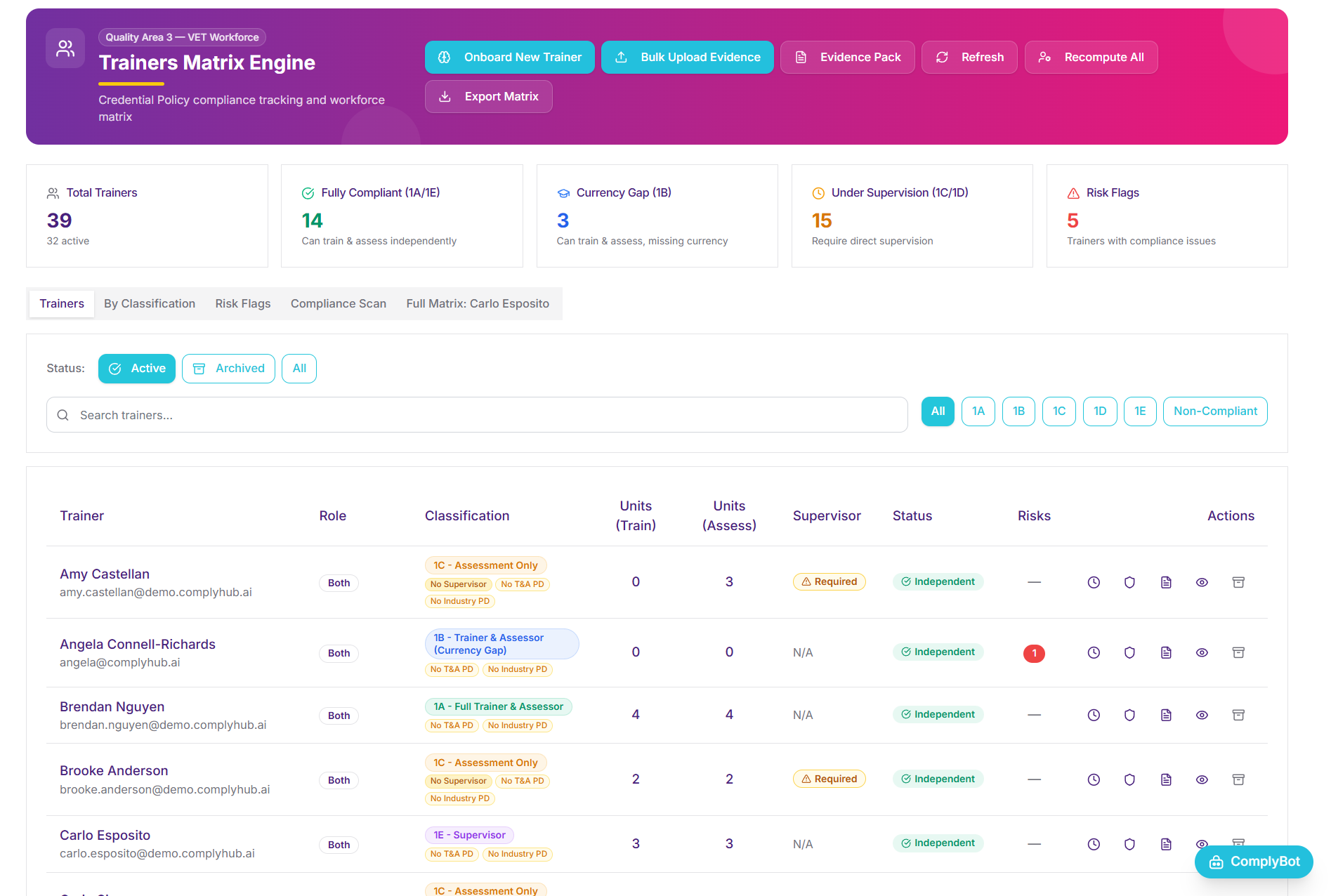
Click or tap the markers to explore each feature
Built Once. Maintained Automatically. Always Audit-Ready.
The Trainers Matrix Engine eliminates the rebuild cycle. Trainers map their credentials once on onboarding. From that point forward, the monthly Trainer Report cycle keeps every record current — without the Compliance Manager having to chase anyone.
Onboard & Map — Once
Each Trainer/Assessor is added to the platform and guided through mapping their qualifications and industry experience against the units they are responsible for delivering or assessing. ComplyHub provides the structure that makes this straightforward — even for trainers who have never done it before. This mapping happens once.
Upload Credential Evidence
TAE certificates, industry currency records, and professional development evidence are uploaded against the trainer's profile. Bulk upload handles large workforces. Evidence is stored, version-tracked, and retrievable on demand.
The Matrix Populates
Once a trainer's profile is complete and evidence has been uploaded, the matrix populates automatically. Credential tier, currency status, units mapped, and any risk flags are all calculated from what has been recorded — no manual matrix construction required from the Compliance Manager.
Monthly Trainer Report Keeps It Current
The Trainer Portal prompts each trainer to submit a monthly report capturing VET professional development completed, vocational PD, and any updates to industry currency. Each submission updates the trainer's matrix record automatically. The Compliance Manager no longer rebuilds the matrix before an audit — the monthly report cycle already has.
Gaps Surface. Nothing Is Missed.
As currency lapses, credentials approach expiry, or supervision requirements change, the matrix updates in real time. Risk flags appear before they become audit findings. The Compliance Scan runs across the entire workforce on demand — so the answer to ASQA's question is always ready.
Built for Everyone Accountable for Workforce Compliance
Compliance Managers
Stop rebuilding the Trainers Matrix from scratch before every audit. Trainers map their credentials once on onboarding, and the monthly Trainer Report keeps every record current from that point forward. The matrix is always ready — because it is always being maintained.
RTO CEOs
Credential non-compliance is one of the most common ASQA audit findings — and one of the most preventable. The Trainers Matrix Engine gives you continuous visibility of your workforce compliance position, with risk flags surfacing before they become findings.
Trainer/Assessors
The Trainer Portal guides each Trainer/Assessor through their initial credential mapping — with clear prompts for each unit they deliver or assess. After that first mapping, the monthly Trainer Report is a brief update: PD completed, currency maintained. The heavy lifting happens once.
Designed to Support Compliance With:
Standards 3.1 & 3.2 — Trainer Credentials
Standards 3.1 and 3.2 require every person delivering and assessing training to hold the credentials specified in the Credential Policy. The Trainers Matrix Engine tracks all five tiers, TAE delivery rules, and validation credentials — giving the RTO continuous visibility of its compliance position against both Standards.
Credential Policy — All Tiers
The Credential Policy specifies the credential requirements for every tier of trainer and assessor, including TAE delivery rules for RTOs delivering TAE qualifications, and validation credentials for those conducting assessment validation. The Trainers Matrix Engine implements the full Credential Policy — not a simplified version of it.
Standard 3.3 — Industry Currency
Standard 3.3 requires trainers to maintain current industry skills and knowledge. Currency gaps (Tier 1B) are surfaced in the matrix as a specific classification — and the monthly Trainer Report is the mechanism by which currency is maintained and recorded, not chased retrospectively before an audit.
IMPORTANT NOTE
Build It Once. Never Rebuild It Again.
Start a free trial today — no credit card required. Your first Trainers Matrix is built on onboarding. The monthly Trainer Report keeps it current from there.